One winners list
Every winner from every community in one list, ready for your mint.
Run the whole collab from one page. Winners of raffles on Fealty land here by themselves. Giveaways your partners ran somewhere else come in as sheets: paste the links or drop the files, and Fealty pulls out every wallet. Check the list, lock it, then export one allowlist per phase for your mint contract, or the CSV.
It lives on the Wallets tab of your template's workspace. Only you and the people you run the template with see it.

- 1Add wallets: sheets from giveaways run elsewhere.
- 2Copy 54 wallets: the valid wallets shown, one per line.
- 3Export: one allowlist per phase for your mint contract, or the CSV.
Add sheets from giveaways run elsewhere
Open Add wallets
Bring everything at once: sheet links, files, or cells you copied.
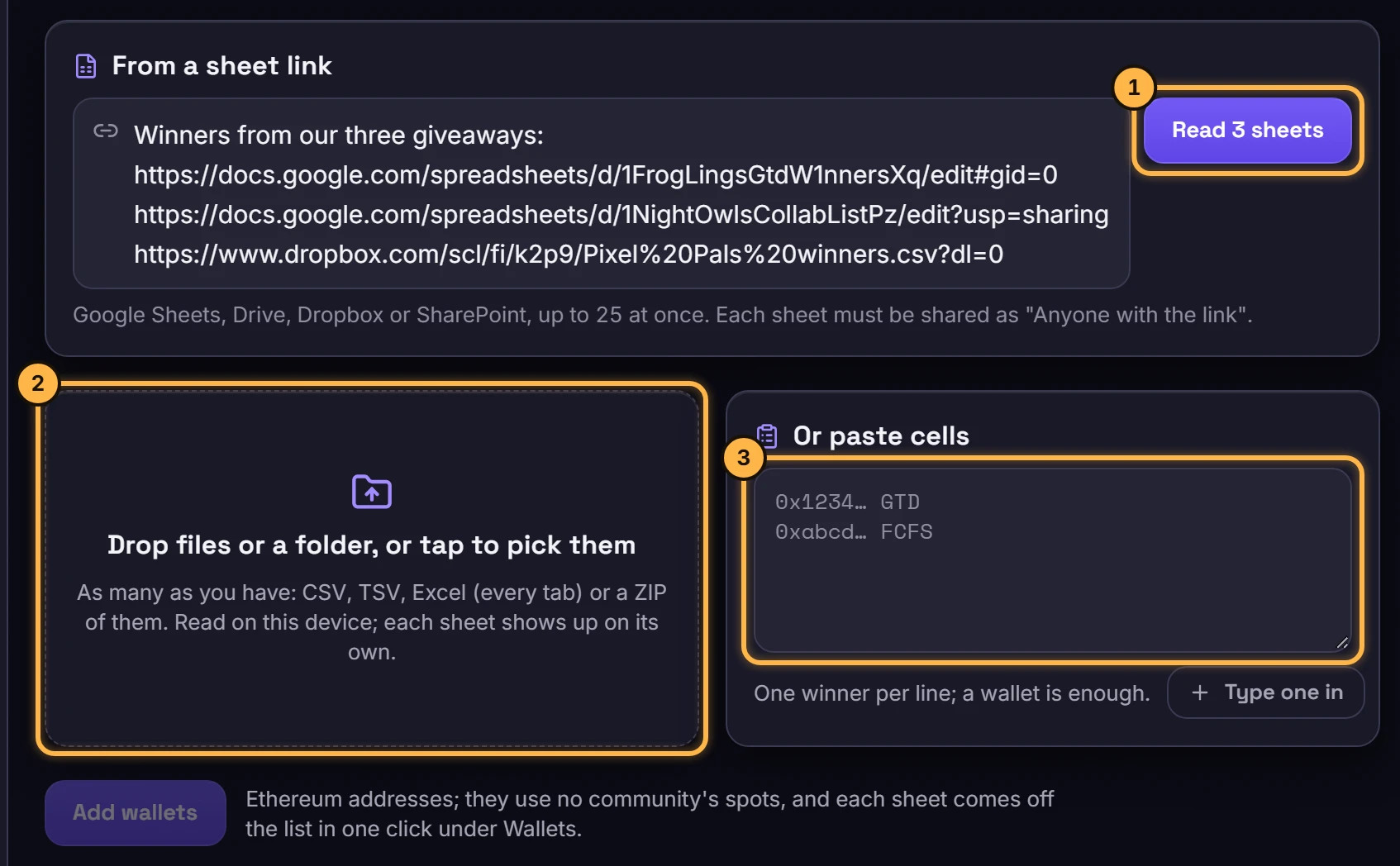
- 1Paste one or many sheet links, even a whole message with words around them. Read 3 sheets.
- 2Drop 5 or 10 files at once, or a whole folder. Excel brings every tab.
- 3Or paste cells straight from a sheet. A wallet per line is enough.
Building a list from scratch? Take the Starter sheet (CSV) from the same page.
Check each sheet
Every sheet, tab or file inside a ZIP gets its own card. What needs a look comes first.
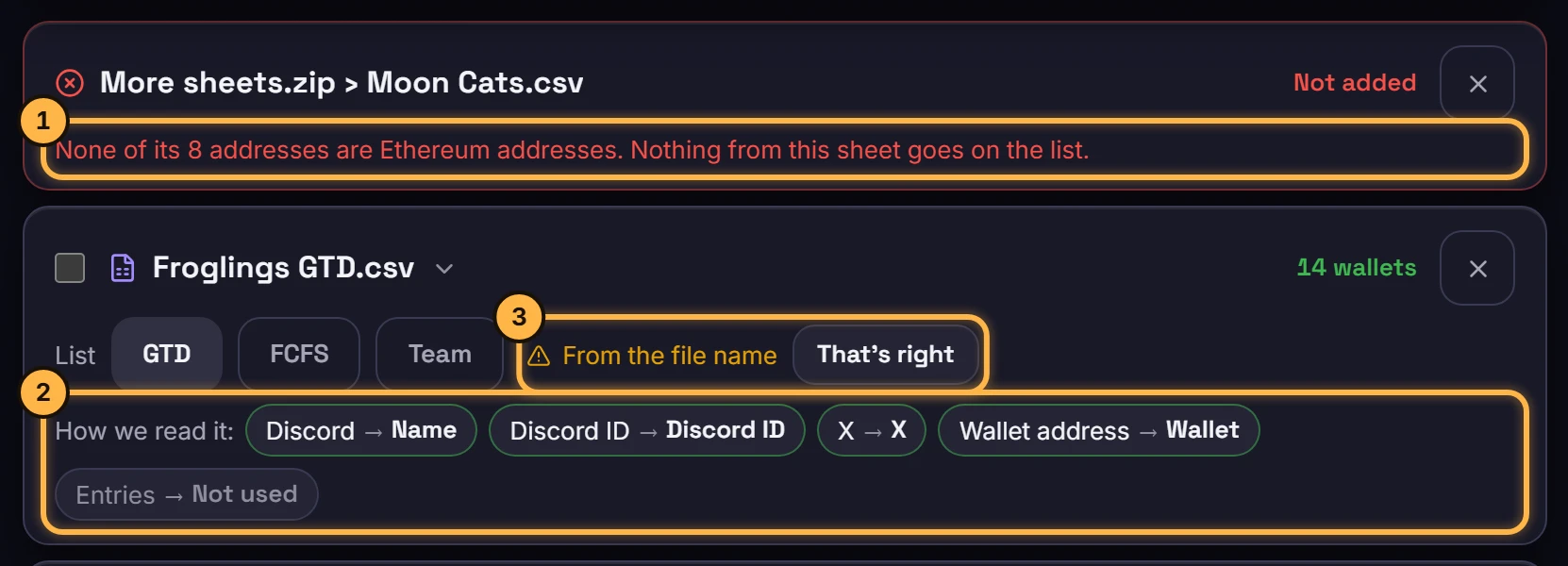
- 1A sheet that isn't a list for your chain is refused whole, with the reason.
- 2How we read it: tap a column to change what it holds.
- 3List: where the sheet's wallets go. The file name set it here: That's right, or tap another list.
Open a card to see its rows. Every field can be changed. A wallet in two sheets goes on once (1 in another sheet). Tick rows to set their list or community together. Moving rows of several sheets off the list their sheet gives asks first.
Add them
Add 44 wallets. Each sheet is saved on its own, and wallets already on the list are skipped. Fealty says how many it added, and Back to Wallets takes you to the list.
How Fealty reads a sheet
Partners send sheets in every shape. Fealty reads what each cell holds, so column order and header names don't matter.
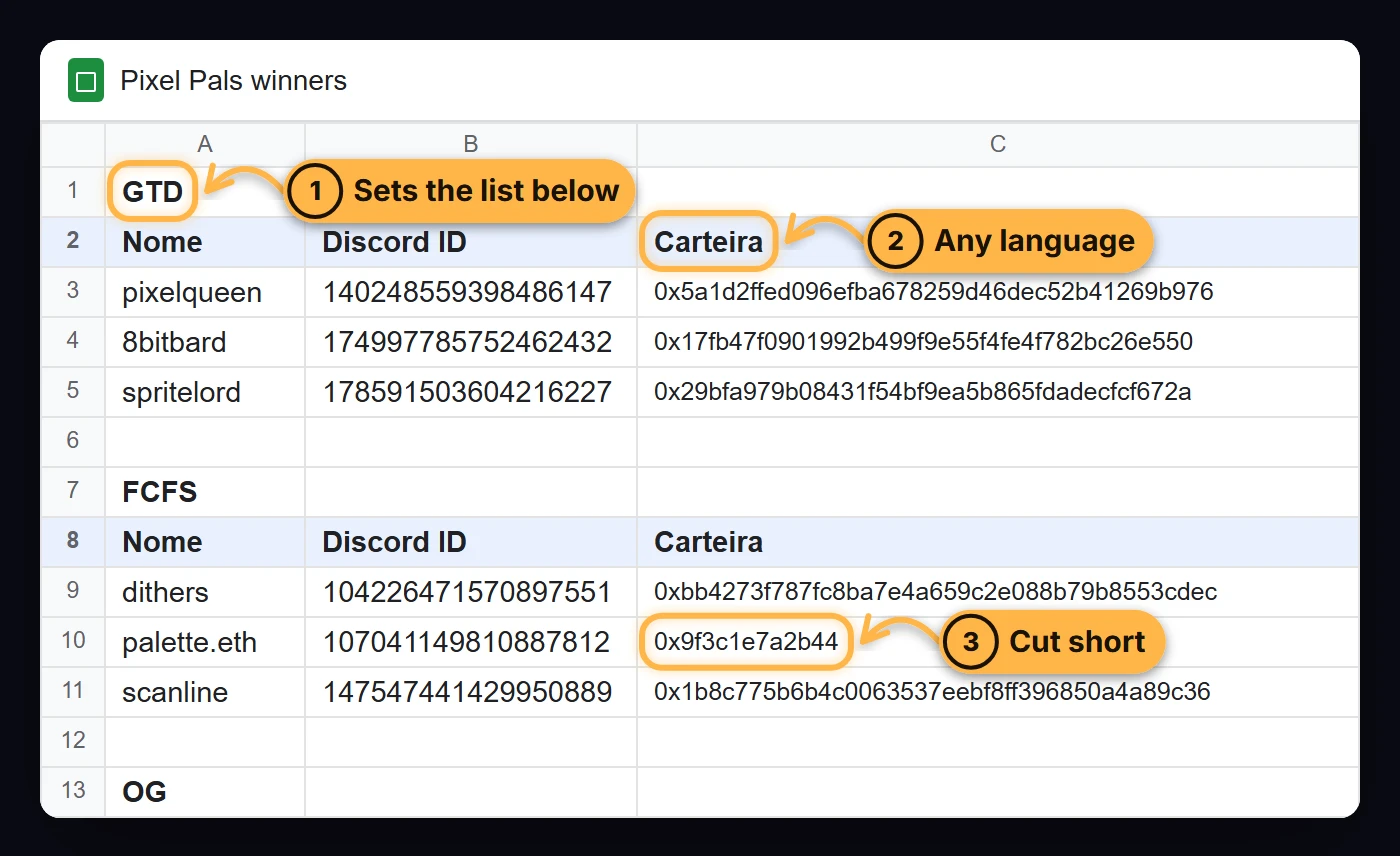
- 1A GTD or FCFS line sets the list for the rows under it.
- 2Headers can sit anywhere, repeat, or be in Portuguese, Spanish or Turkish.
- 3An address cut short is kept, in red, to fix or drop.
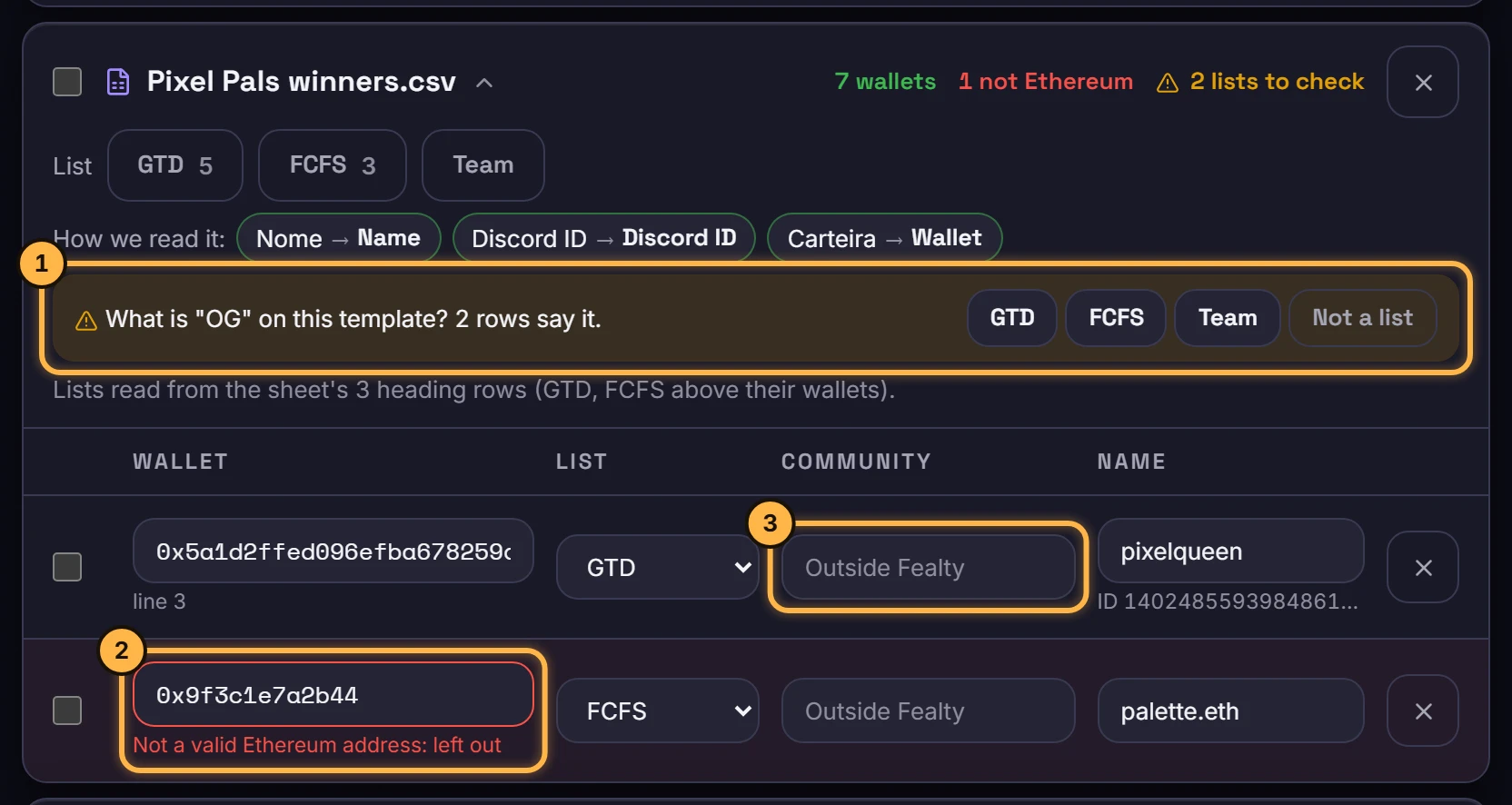
- 1A word Fealty doesn't know, like OG, is asked about once: GTD, FCFS, Team or Not a list. Fealty remembers it.
- 2Not a valid Ethereum address: left out until you fix it.
- 3Type a partner's name, or pick one with spots. Empty means Outside Fealty.
An export of every entrant with a Won column? Fealty reads only the winners.
Check the list
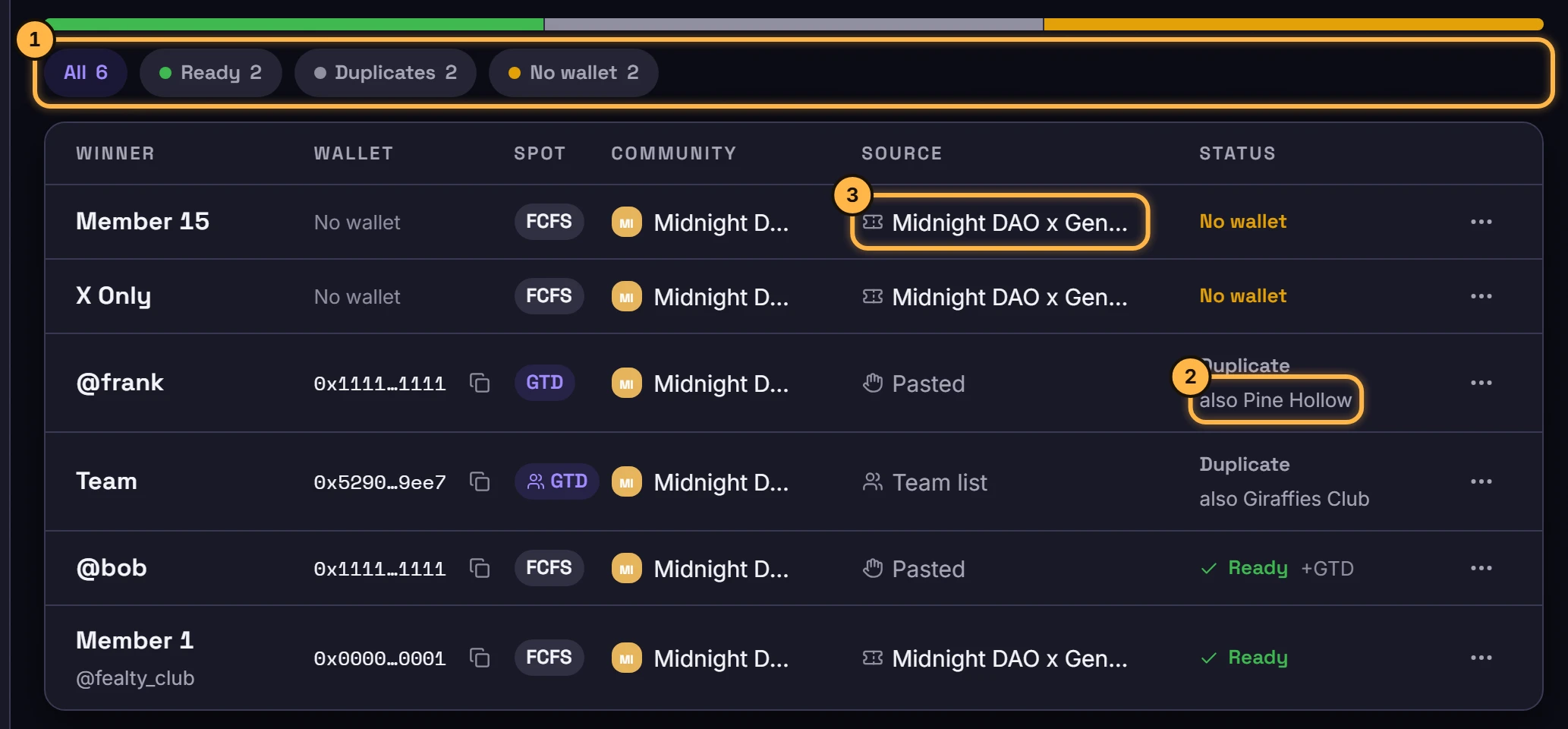
- 1The bar shows the whole list at a glance. Tap a chip to see only those rows.
- 2Duplicate: the same wallet on another partner's list. Tap also Pine Hollow to see both rows.
- 3Every source opens: the raffle on Fealty, the partner's sheet, or its giveaway.
- Ready goes on the list. +GTD means the wallet is on the GTD list too: only a note.
- Duplicates: one person can win with two communities, so two partners may send the same wallet. Only your team sees it, and it goes in the files once. Beside the budget on Partners and Requests, "2 GTD sent twice: 2 to spare" tells you how many more spots fit. To fill every spot anyway, press Ask for another while the lists are open: the winner (or the partner) hears it in the app and by DM. Nothing comes off a partner's list: Export › Duplicates leaves the later rows out of the files.
- No wallet: Fealty asks the winner once. With no wallet 48 hours later, the spot goes back to their community.
- Not valid: not an address of the mint chain. It stays out of the files.
- Same person +1: one Discord account sent another wallet too. Tap it to see all of that person's rows.
Find any row
Search a name, @handle, wallet or raffle. Filter by Spot, Community (several at once), Source (Raffle, Pasted list from a partner's sheet, Team list from team spots, By hand) or Raffle. Sort puts Needs a look first at the top, or orders by newest, oldest, community or name.
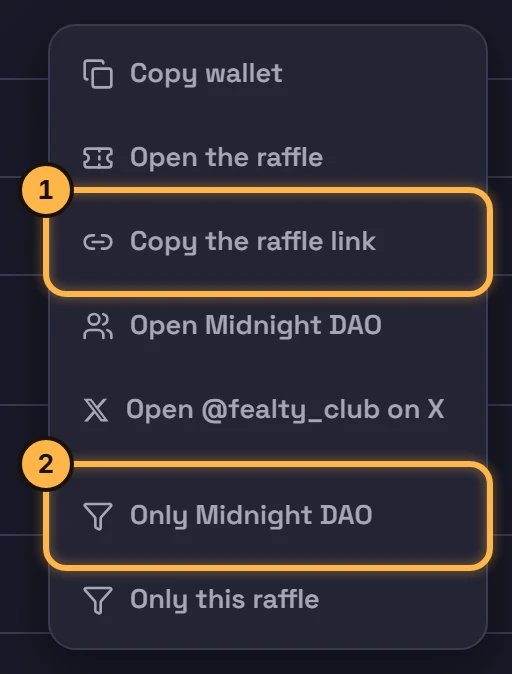
- 1Copy the row's links: the raffle, or the partner's giveaway.
- 2Only Midnight DAO and Only this raffle narrow the list to it.
The menu at the end of each row also opens the community on Fealty, the sheet and the winner's X. A wallet you added by hand comes off from there.
Update or remove a sheet
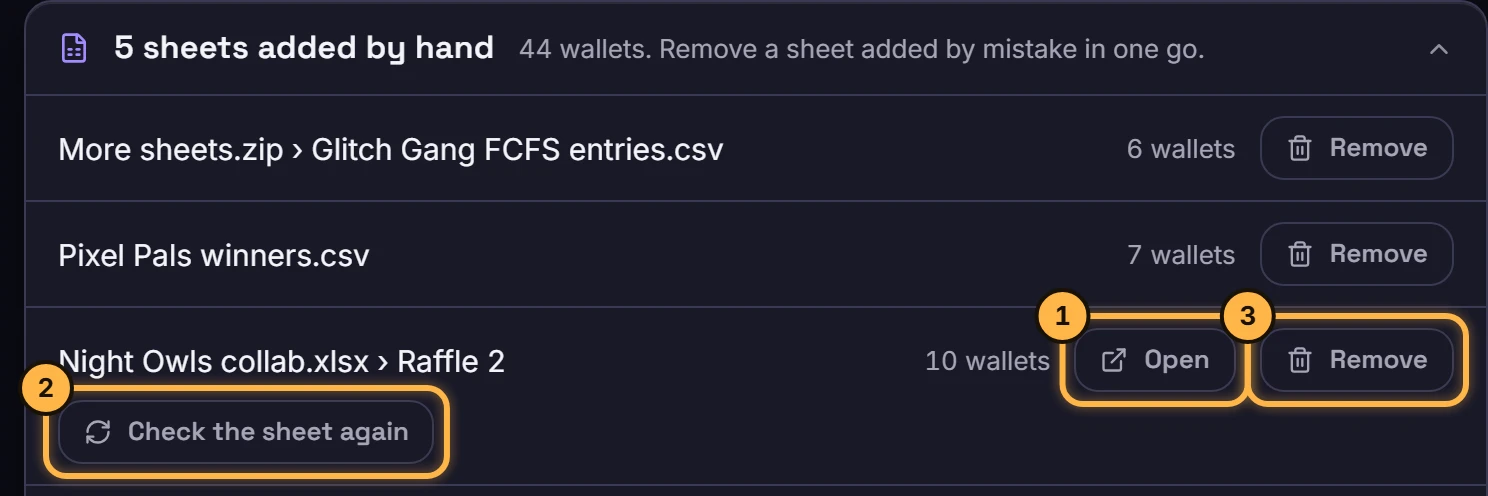
- 1Open the sheet a link came from.
- 2Check the sheet again: the partner changed it? Add the new wallets, remove the gone ones.
- 3Remove: a sheet added by mistake comes off in one go.
Lock and export
Partners, late ones too, send and change wallets until you lock the final list. Lock it now, or set the date it locks.

- 1Lock now: the partner lists close and the list is frozen as a version.
- 2Set a date: the list locks by itself then.
- Partners with spots left get a last call 24 and 6 hours before the date, in the app and by DM: whoever asked, and their community's raffle team.
- No date set: it locks 48 hours before mint. No mint date either: it stays open until you lock it.
- The same date is Final list locks on your brief.
- Export offers the locked version's files. Changed something? Lock again: it becomes version 2.
- Reopen opens the lists until a later date, or with No end date.
Am I on the list? stays closed until you open it: visitors see that the winners are being finalized. Next to the lock, press Open now or Set a date (a countdown shows until then). When it opens, your winners, your partners and everyone who tapped Notify me hear it once.
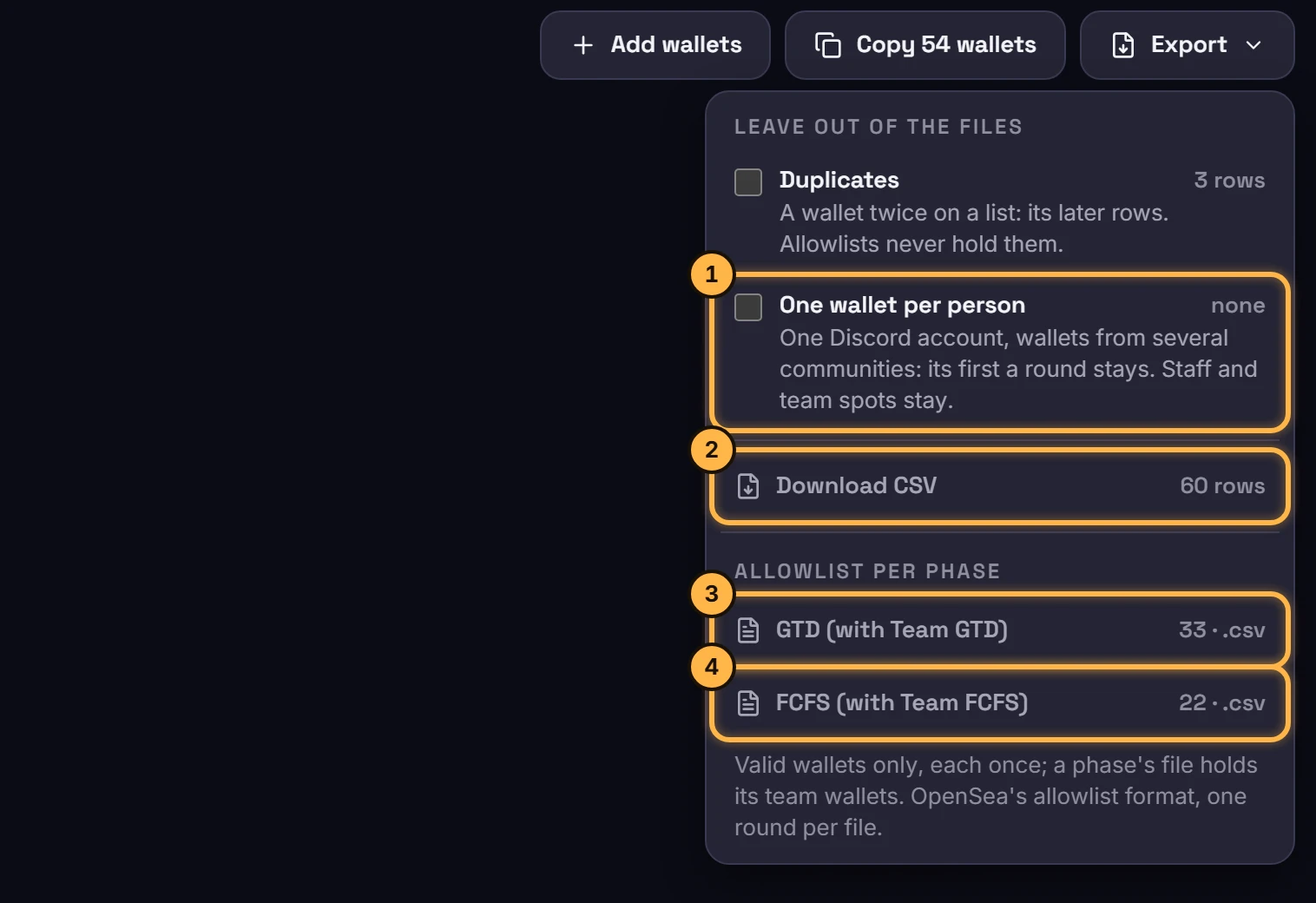
- 1Leave out of the files: a wallet's later rows, or a person's extra wallets. The list itself stays as it is.
- 2Download CSV: every row, with wallet, spot, community, raffle and names.
- 3Allowlist per phase, GTD: OpenSea's allowlist CSV, one round per file, team wallets included.
- 4The same for FCFS. Valid wallets only, each once, ready for the mint contract.