Your server dashboard
What needs you, how the week went, what is live and what changed, on one page.
Dashboard is the first tab on your community's Manage side. Read it top to bottom: what needs you, how the week went, what happened.
The health strip

One chip per place Fealty works: Discord, Telegram and Web page. Green means it works. When something is wrong the chip says what (not set up, 2 permissions missing, role too low, removed from the server). Click a chip to land on its fix.
Needs attention
One row per thing to do, each with its button.
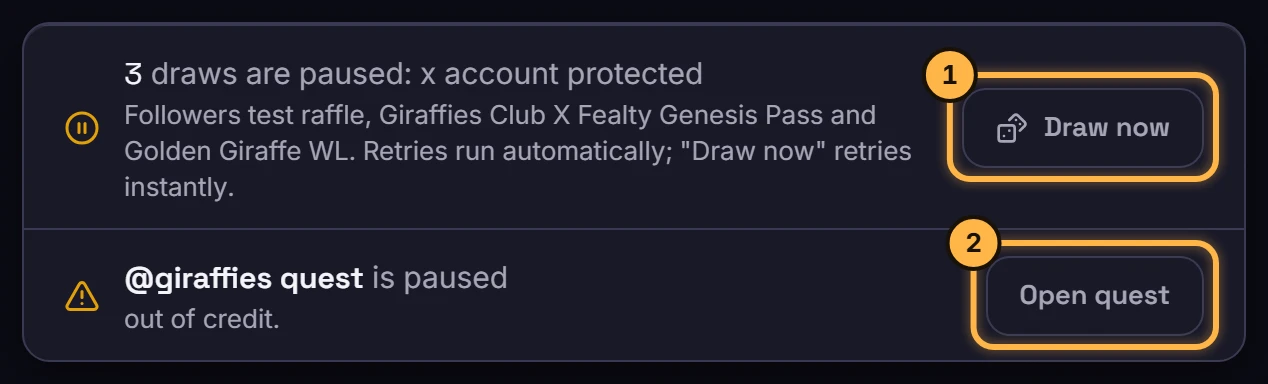
- 1Draw now draws raffles that closed without winners. Raffles stuck for the same reason share one row.
- 2A paused quest links to its fix: Open quest, Add credit or Connect X.
What can show up here:
- Raffles that ended and wait for their draw, or whose draw is paused.
- Paused quests.
- A scheduled raffle that opens within a day with no channel to post to.
- Engagement credit at $1.00 or less while you run quests or have X connected.
- Fealty's role sitting below roles it has to give, or missing bot permissions.
- A plan limit reached.
Nothing waiting? You see All clear. The red dot next to your server in the sidebar follows this same list. Support tickets never land here: they wait on Support as long as your team likes.
Pulse
This week against last week. The headline is raffle entries (before your first entry, your busiest figure): a solid line for this week, a dashed one for last week. Analytics opens 7, 30 and 90 day charts.
Below it, one tile each for New members, Raffle entries, Quest completions, Points earned, Tickets opened and Sales: this week, the change, last week. Figures refresh every few minutes.
Live now
Open raffles and running quests, with their entries and when they end. One not posted anywhere yet has Post it. Two lines under them: Waiting on you counts ended raffles, Upcoming scheduled ones. With nothing live, New raffle and New quest start one.
Recent activity
The latest changes, by whom. Changes made in Discord carry the admin's name. All activity opens the full, searchable log on Team.
The side column
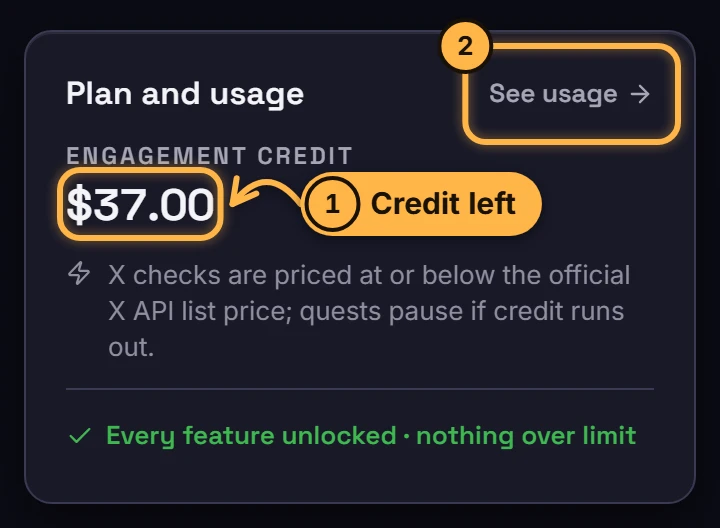
- 1Your prepaid Engagement credit.
- 2See usage for the full meter.
The card also shows what this month used and your plan's limits, closest first. Under it, Latest sales lists your last five sales posts, and Reach shows members on Fealty, Discord and Telegram members and X followers.
On a newer server a Next step card sits on top. It suggests one thing to set up next: Telegram, X, a collection, a holder role rule, a first raffle or quest, the support desk, your team. Press × (Not for this community) to skip a suggestion for good.